You can assign ordering party accounts to your bank access. Payment orders for these ordering party accounts are automatically submitted to the financial institution via the assigned bank access. The bank access selection step might be omitted when submitting a payment order.
|
1. |
Under , select the tab Bank accesses. |
||
|
2. |
Double-click on the bank access to which you want to assign ordering party accounts. |
||
|
3. |
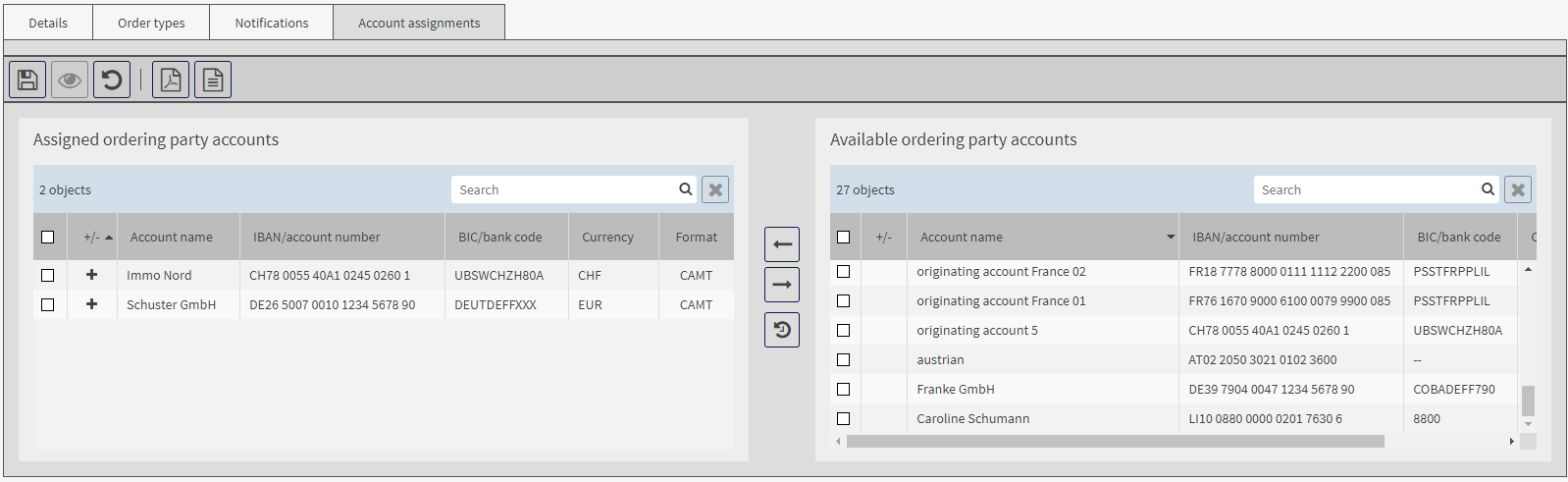
Go to the tab Account assignments. |
||
|
|

|
||
|
4. |
In the mask area Available ordering party accounts, activate all accounts for which payment orders are to be submitted via this bank access and click on
|
||
|
5. |
To cancel an assignment, activate the checkbox in front of the ordering party account in the mask area Assigned ordering party accounts. |
||
|
6. |
Save the data. |
 .
.